Frequently Asked Questions
We’ve gathered frequently asked questions and answers about our mileage logbook, how it works, what the Swedish Tax Agency’s recommendations require, and how to get started.
Can’t find what you’re looking for? Don’t hesitate to contact us at hej@dinamil.se
Digital Mileage Logbook
-
What is a digital mileage logbook?
A digital solution helping you to automatically log your trips directly from the car’s built-in connectivity. No more pen and paper, trying to remember when you drove where.
-
How does a digital mileage logbook work without any additional hardware?
Unlike most other digital mileage logbooks that require you to install or bring some additional device, Dina Mil uses the car’s built-in connectivity to gather the data needed to create your mileage logbook.
Didn’t know that your car had built in connectivity? Have a look at our supported vehicles list and see if your car is supported.
-
What does it mean that my car is connected and how is my data collected?
For some time now, all vehicle manufacturers have been connecting their new cars. Partly to be able to offer new services, but also to guarantee safety features such as e-call, and to allow the opportunity to see how the cars are doing over time. When a car is connected, the car continuously sends data to the car manufacturer's own cloud platform.
As the owner of the car, you have the right to access your data and to let others, such as Dina Mil, use the data on your behalf to deliver services that you want to use. Dina Mil integrates with vehicle manufacturers and cooperates with the supplier High Mobility, which enables us to retrieve data from different car brands in a uniform way without you having to install any additional hardware in the car.
If you want to know more about how Dina Mil handles your data, you can read our privacy policy here.
-
Do I need to install any new hardware in my car?
No, Dina Mil uses your car's existing connectivity and only collects the data needed to create a driving journal. This way you avoid complicated or just annoying hardware installations.
-
What car brands and models does Dina Mil support?
Dina Mil works with most models of company-owned cars. See what car models are supported here.
How Does Dina Mil Work?
-
How does Dina Mil work for me as a fleet administrator?
As a fleet administrator, you are in control of adding vehicles and drivers to the service. You can easily check the status of the vehicles' connection and follow the drivers' driving journals at the beginning of each month. In addition, you can get an overview of each driver's total business mileage, which helps you follow up on annual goals.
As a fleet administrator, you have the ability to approve or reject the mileage logs and, if necessary, download all mileage logs in a suitable format. Everything is organized, efficient and user-friendly.
-
How does Dina Mil work for me as a driver?
As a driver you get an overview of both your private and work-related trips, clearly presented in our web interface. You can access Dina Mil either via computer or mobile, you don't need to download an app.
Once a trip has been registered, you can easily add notes and at month-end submit it to your administrator for approval. If needed, you can export all your trips to a format recommended by the Swedish Tax Authority.
-
How does Dina Mil work for me as self-employed?
Dina Mil is easy to use for you as a self-employed professional with a company car.
You can easily switch between the administrator and driver views to keep track of your trips and how you use your car. When needed, you can export your driving log and choose whether or not to include private trips.
-
Can I easily modify the vehicle fleet?
As a fleet administrator, you have full control over which cars you have connected to the service. When your company acquires new or replaces older cars, you can easily update the fleet. Any driving journals created with previous cars will continue to be available.
You can choose to add all your cars at registration, or to add them continuously as you see a need. To add a car, all you need is your car's registration number and information about which driver you want to assign the car to.
-
How many cars does Dina Mil support?
Dina Mil works just as well for self-employed as for larger fleets, where mileage logs need to be approved by an administrator.
-
How is my car’s data collection activated?
Car data is collected directly from the vehicle manufacturers via their own cloud services. Through our collaboration with High Mobility, we gain access to the car data in a standardized and secure way. This way, we can retrieve trip data directly from the cars.
Dina Mil’s data processing is activated automatically as soon as we start receiving data from your car. The activation process of the data connection can vary depending on the car brand but always happens in the background. For some brands, the activation takes place within just a few minutes, in other cases it may be necessary for the car to be driven, as normal, a few times before the systems are fully synchronized. Once everything is up and running, Dina Mil automatically starts collecting trip data to create your driving journal.
Read more about High Mobility here.
-
Why can't I track my employees' trips in real time with Dina Mil?
Dina Mil is a service designed to help companies to easily and efficiently keep mileage logs for their fleet. This means that Dina Mil only processes data in order to compile a mileage logbook that meets the Swedish Tax Authority’s recommendations.
There are no recommendations regarding being able to see the position of vehicles at any given time. Therefore, Dina Mil does not have any features or map services that offer real time employee or asset tracking.
-
How do I add drivers and cars?
During the onboarding process, you have the option to add your drivers. This is done by entering their email address and personal number. The personal number allows them to use BankID for login. This is all the information needed to create a driver in Dina Mil.
Next, add the information for the car you want to link to the driver (registration number, or VIN and make). Once you have repeated this for all the drivers and cars you want to add, your fleet is created.
You can choose to add all drivers during onboarding, or add more at a later time. Once the drivers have been added to your fleet, they will receive an email invitation from Dina Mil with a link to complete their individual registration.
Why Do I Need A Mileage Logbook?
-
Do I have to keep a mileage logbook as self-employed?
There is no legal requirement to keep a digital mileage logbook per se, but it is your responsibility as a company to be able to show how the car has been used in the event of a possible audit by the Swedish Tax Authority.
A digital mileage logbook is the best and easiest proof to provide an overview of all trips, both private and work-related. Let Dina Mil do the hard work of registering the trips, leaving you only having to add notes about the purpose. Maybe you will even discover business trips that you have missed?
-
Why is a mileage logbook needed for an audit?
A mileage log serves as evidence in the event of an audit. According to the Swedish Tax Authority, you as a driver and the company are responsible for proving that the car has been used correctly.
Without a mileage logbook, you risk being taxed on benefits up to five years retroactively, even if you have followed the rules. With Dina Mil, you can clearly distinguish which trips are private and which are for business purposes. This reduces the risk of disputes.
-
How does Dina Mil save me time?
Dina Mil automatically logs your trips in the format recommended by the Swedish Tax Authority, with addresses and driving distances.
As a driver, you need to add the purpose of the trip and then you're done. In the event of a possible inspection by the Swedish Tax Authority, you just need to export the milage log and submit it.
-
Do employees need to consent to the driving journal?
No, according to The Swedish Authority for Privacy Protection's (IMY), consent is not required for electronic mileage logs, as long as the data collection is limited and relevant for the purpose.
Dina Mil follows these recommendations by:
Only storing start and end addresses – not exact routes or live location data.
Minimizing data collection to what is necessary to comply with tax legislation.
Not storing location data unnecessarily – only for as long as necessary.
Complying with GDPR with privacy protection as standard.
Read more about consent related to mileage logs at The Swedish Authority for Privacy Protection's (IMY) here.
The Swedish Tax Authority Recommendations
-
Is my driving journal automatically sent to the Swedish Tax Authority?
No, your driving journal is not automatically sent to the Swedish Tax Authority. However, it is ready and waiting for you at Dina Mil, if the Swedish Tax Authority comes knocking at your door.
-
Is Dina Mil approved by the Swedish Tax Authority?
Yes, our digital mileage logbook contains all the information that the Swedish Tax Authority recommends.
-
What does the Swedish Tax Authority check?
The Swedish Tax Authority (Skatteverket) checks mileage logs to ensure that a company car is used in accordance with the rules that apply to business and private driving. The purpose is for instance, to assess whether the driver of the car should be taxed on benefits or not.
-
What should a mileage logbook include?
According to the Swedish Tax authority's recommendations, a mileage logbook should contain:
odometer reading at the beginning of the year
odometer reading at the end of the year.
the car's registration number
current year
date and odometer reading at the start and end of each trip
how many kilometers the employee drives each trip
which address the trip started from and ended at
purpose of the trip
which places, companies or contact persons the employee has visited (not needed for private trips)
notes about the driver and refueling, etc.
Get Started
-
How does the free trial work?
When you start your free trial, you receive the remaining days of the current month plus access until the 25th of the following month at no cost. You can use the service with full functionality from day one.
When will I be charged?
You will only be charged after the free trial ends, on the 25th of the following month.
Do I need to provide payment details to start the free trial?
Yes, you need to enter your payment details to create an account. However, no charges will be made during the free trial period.
Can I cancel before the trial ends?
Yes, you can cancel at any time during the free trial. If you cancel before the trial ends, you will not be charged.
-
How much does Dina Mil cost?
Dina Mil costs 159 SEK per month and per car (excluding VAT).
You pay monthly in advance, starting from the month after you add your first car. The monthly fee is based on the number of cars in your fleet at the end of each month.
-
How do I create an account?
Dina Mil uses BankID to securely verify your identity and create your account. Once that is done, you can continue to easily add cars and invite any additional drivers.
-
What happens when the free trial ends?
If you choose to continue, your account will automatically convert to a paid subscription. The service will be charged according to the applicable pricing unless it is canceled before the end of the trial period, that is, before the 25th of the following month.
-
What payment options does Dina Mil offer?
Payment is made monthly via our payment partner Stripe. When you sign up, you agree to have your credit card automatically charged each month until you choose to cancel your subscription.
-
When will my car be connected?
As soon as we start receiving car data, Dina Mil will be activated and your car will be connected. Read more about how your car is activated here.
-
Is there a contract period?
You are not bound for any specific period by contract. Dina Mil is paid in advance for the coming month.
-
How many cars can I add to Dina Mil?
You can add an unlimited number of cars to Dina Mil. As an administrator, you can register up to 10 cars directly in the system.
If you need to add more vehicles, please contact our support and we will help you.
Get going in just a few minutes
In three easy steps.
No hardware, no commitment period.
159 SEK/month
Start your one month free trial now!
*excluding VAT, per vehicle and per month.
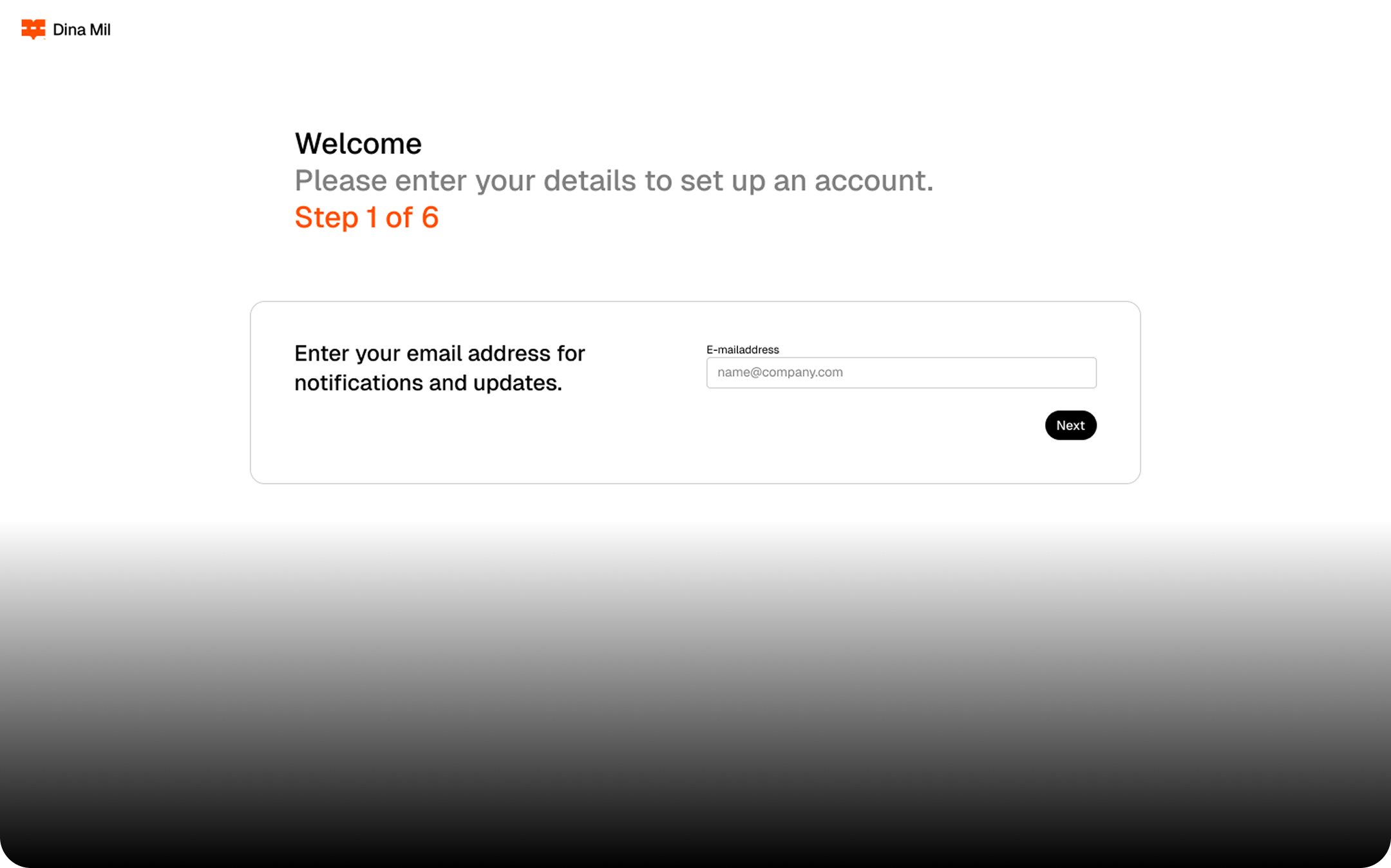
Set up your account in minutes Simply enter your email, verify with BankID, add your payment details – and you’re good to go!
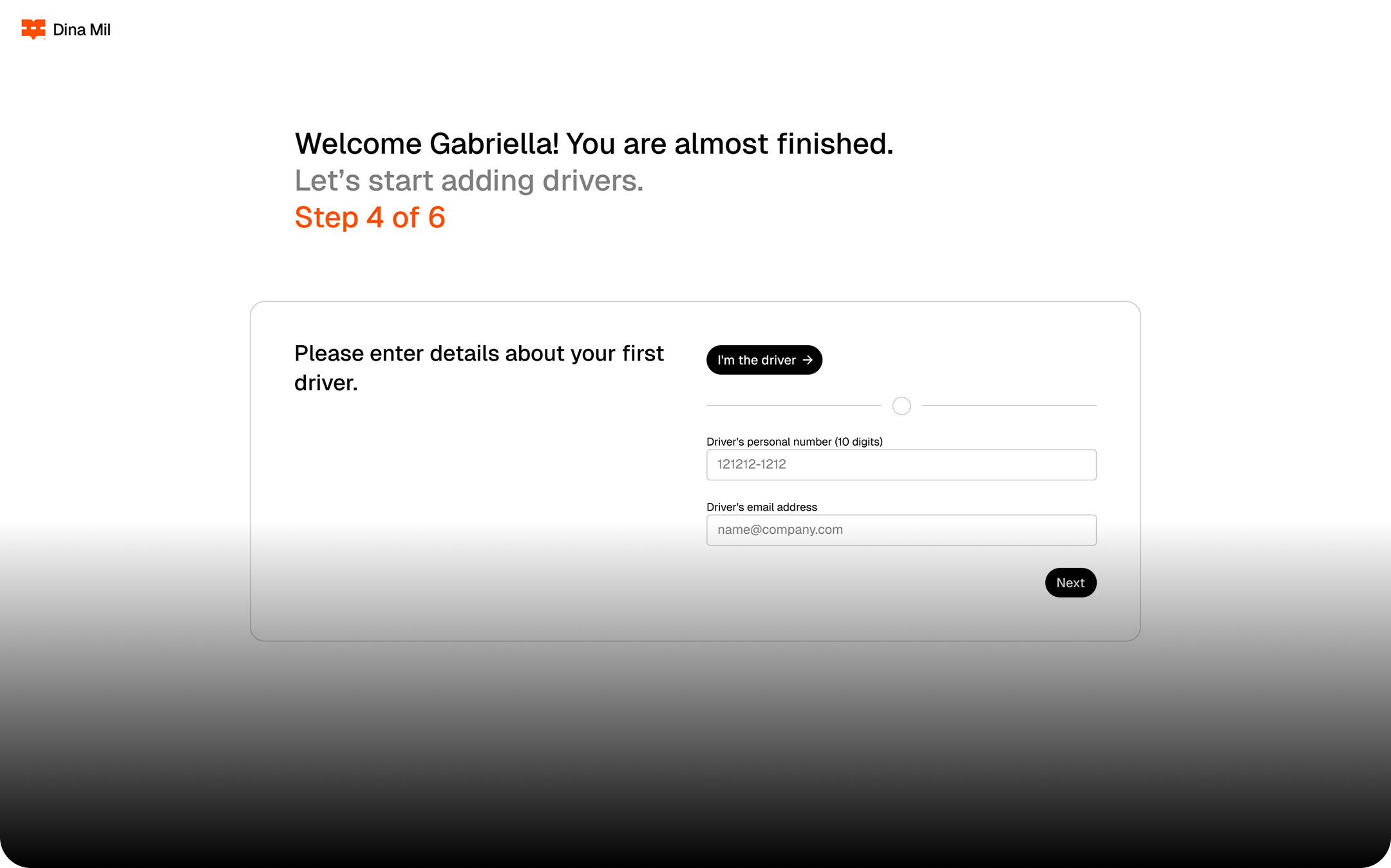
Add a car for yourself or an employee in seconds. The car’s connection is activated automatically, no extra hardware needed, and trips start being registered as soon as the car starts to send data.
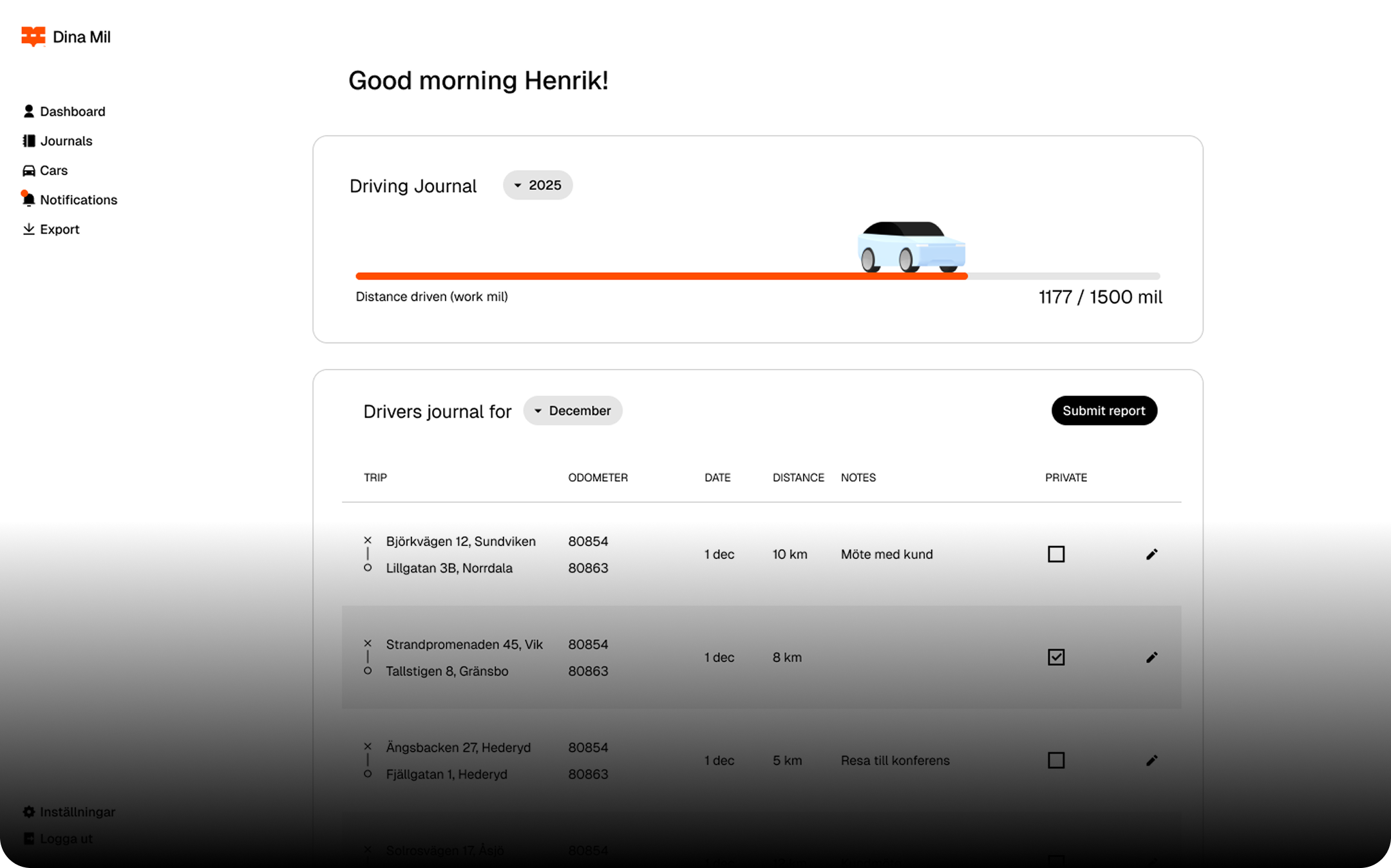
Trips are recorded automatically as you or your employees drive. As a driver, all you need to do is add a brief note. Simple, seamless, and completely hassle-free.
© Dina Mil 2026
Dina Mil
C/O
Haysquare AB
Olof Palmes Gata 29, TR 4
111 22, Stockholm
Sweden
hej@dinamil.se